
Proxying Web Traffic
The Caido CLI (server component) is an HTTP proxy server that forwards the bidirectional communication between a client and a server.
HTTP proxy servers operate in a few distinct ways depending on:
- If the client is able to be directly configured to utilize a proxy server or not.
- If the traffic is in cleartext (HTTP) or encrypted (HTTPS).
Proxy-Aware Clients
Clients that can be configured to utilize a HTTP proxy server via native settings, are considered to be "proxy-aware".
By manually configuring the connection settings (or by using a browser extension), we are able to proxy the traffic the browser generates, intended for a web server, through Caido.
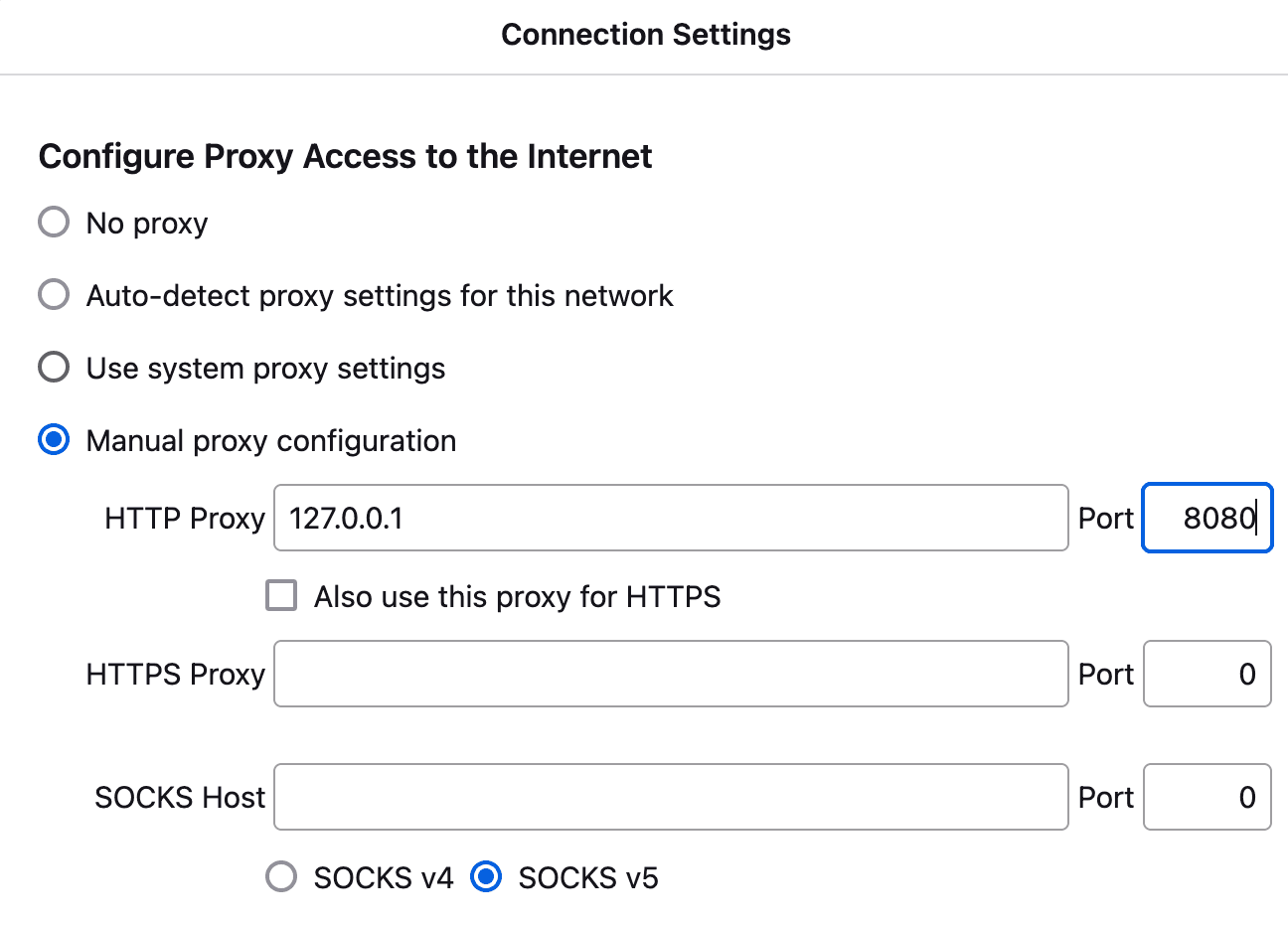
Other clients, such as command-line tools allow you to specify the listening address of the proxy server via arguments.
For example, by using the -x command-line argument and Caido's listening address, curl will instruct Caido to make a request to example.com on it's behalf.
HTTP
└─$ curl -x 127.0.0.1:8080 http://example.com -v
*   Trying 127.0.0.1:8080...
* Established connection to 127.0.0.1 (127.0.0.1 port 8080) from 127.0.0.1 port 53219
* using HTTP/1.x
> GET http://example.com/ HTTP/1.1
> Host: example.com
> User-Agent: curl/8.17.0
> Accept: */*
> Proxy-Connection: Keep-Alive
>
* Request completely sent off
< HTTP/1.1 200 OK
< Date: Sat, 03 Jan 2026 19:44:03 GMT
< Content-Type: text/html
< Connection: keep-alive
< CF-RAY: 9b84fd17ee220ff9-LAX
< Last-Modified: Sat, 03 Jan 2026 05:43:21 GMT
< Allow: GET, HEAD
< Age: 4371
< cf-cache-status: HIT
< Accept-Ranges: bytes
< Server: cloudflare
< Content-Length: 513
<
<!doctype html><html lang="en"><head><title>Example Domain</title><meta name="viewport" content="width=device-width, initial-scale=1"><style>body{background:#eee;width:60vw;margin:15vh auto;font-family:system-ui,sans-serif}h1{font-size:1.5em}div{opacity:0.8}a:link,a:visited{color:#348}</style><body><div><h1>Example Domain</h1><p>This domain is for use in documentation examples without needing permission. Avoid use in operations.<p><a href="https://iana.org/domains/example">Learn more</a></div></body></html>
* Connection #0 to host 127.0.0.1:8080 left intact
HTTPS
If a proxy-aware client would like to establish an encrypted connection with the destination server, the client will first send a CONNECT method request to the proxy server that states the destination server to create a tunnel with.
CONNECT example.com:443 HTTP/1.1
Host: example.com:443
User-Agent: curl/8.17.0
Proxy-Connection: Keep-Alive
Once the tunnel is established, traffic will still pass through the proxy server but it will be obfuscated.
However, if the client has imported the CA certificate of the proxy server, it is viewed as a trusted entity. This allows the proxy server to establish TCP/TLS connections with both the client and the destination server, holding the derived symmetric keys for both connections so data can be encrypted and decrypted in both directions.
To ensure the the domain name of the client’s request matches the domain name in the certificate, Caido dynamically generates certificates for the destination server.
└─$ curl -x 127.0.0.1:8080 https://example.com -v
*   Trying 127.0.0.1:8080...
* CONNECT: no ALPN negotiated
* allocate connect buffer
* Establish HTTP proxy tunnel to example.com:443
> CONNECT example.com:443 HTTP/1.1
> Host: example.com:443
> User-Agent: curl/8.17.0
> Proxy-Connection: Keep-Alive
>
< HTTP/1.1 200 OK
<
* CONNECT phase completed
* CONNECT tunnel established, response 200
* ALPN: curl offers h2,http/1.1
* TLSv1.3 (OUT), TLS handshake, Client hello (1):
* SSL Trust Anchors:
*   CAfile: /etc/ssl/certs/ca-certificates.crt
*   CApath: /etc/ssl/certs
* TLSv1.3 (IN), TLS handshake, Server hello (2):
* TLSv1.3 (IN), TLS change cipher, Change cipher spec (1):
* TLSv1.3 (IN), TLS handshake, Encrypted Extensions (8):
* TLSv1.3 (IN), TLS handshake, Certificate (11):
* TLSv1.3 (IN), TLS handshake, CERT verify (15):
* TLSv1.3 (IN), TLS handshake, Finished (20):
* TLSv1.3 (OUT), TLS change cipher, Change cipher spec (1):
* TLSv1.3 (OUT), TLS handshake, Finished (20):
* SSL connection using TLSv1.3 / TLS_AES_256_GCM_SHA384 / x25519 / RSASSA-PSS
* ALPN: server did not agree on a protocol. Uses default.
* Server certificate:
*   subject: C=CA; ST=CA; O=Caido; CN=Caido Generated Certificate
*   start date: Dec 27 19:47:46 2025 GMT
*   expire date: Jan 10 19:47:46 2026 GMT
*   issuer: C=CA; ST=QC; O=Caido; CN=Caido
*   Certificate level 0: Public key type RSA (2048/112 Bits/secBits), signed using ecdsa-with-SHA256
*   Certificate level 1: Public key type EC/prime256v1 (256/128 Bits/secBits), signed using ecdsa-with-SHA256
*   subjectAltName: "example.com" matches cert's "example.com"
* SSL certificate verified via OpenSSL.
* Established connection to 127.0.0.1 (127.0.0.1 port 8080) from 127.0.0.1 port 53219
* using HTTP/1.x
> GET / HTTP/1.1
> Host: example.com
> User-Agent: curl/8.17.0
> Accept: */*
>
* TLSv1.3 (IN), TLS handshake, Newsession Ticket (4):
* TLSv1.3 (IN), TLS handshake, Newsession Ticket (4):
* Request completely sent off
< HTTP/1.1 200 OK
< Date: Sat, 03 Jan 2026 19:47:49 GMT
< Content-Type: text/html
< Connection: keep-alive
< CF-RAY: 9b85029889038a80-LAX
< last-modified: Sat, 03 Jan 2026 05:43:21 GMT
< allow: GET, HEAD
< Age: 2128
< cf-cache-status: HIT
< Accept-Ranges: bytes
< Server: cloudflare
< Content-Length: 513
<
<!doctype html><html lang="en"><head><title>Example Domain</title><meta name="viewport" content="width=device-width, initial-scale=1"><style>body{background:#eee;width:60vw;margin:15vh auto;font-family:system-ui,sans-serif}h1{font-size:1.5em}div{opacity:0.8}a:link,a:visited{color:#348}</style><body><div><h1>Example Domain</h1><p>This domain is for use in documentation examples without needing permission. Avoid use in operations.<p><a href="https://iana.org/domains/example">Learn more</a></div></body></html>
* Connection #0 to host 127.0.0.1:8080 left intact
Thick Clients
Certain clients (such as installed desktop applications), that cannot be configured to utilize a HTTP proxy server via native settings, are referred to as "thick clients" and are considered to be "proxy-unaware" as they expect to communicate with a destination server directly.
Due to this, thick clients will not generate CONNECT method requests.
However, their traffic can still be proxied by configuring local DNS settings and port forwarding so the listening address of the destination server resolves to the listening address of the proxy server. This technique is known as "invisible proxying".
TIP
View the Invisible Proxying for Non-Proxy Aware Thick Clients tutorial for a detailed walk-through on configuring invisible proxying.
HTTP
└─$ curl http://example.com -v
* Host example.com:80 was resolved.
* IPv6: (none)
* IPv4: 127.0.0.1
*   Trying 127.0.0.1:80...
* Established connection to example.com (127.0.0.1 port 80) from 127.0.0.1 port 53219
* using HTTP/1.x
> GET / HTTP/1.1
> Host: example.com
> User-Agent: curl/8.17.0
> Accept: */*
>
* Request completely sent off
< HTTP/1.1 200 OK
< Date: Sat, 03 Jan 2026 22:07:17 GMT
< Content-Type: text/html
< Connection: keep-alive
< CF-RAY: 9b85cee559350928-LAX
< Last-Modified: Sat, 03 Jan 2026 05:43:21 GMT
< Allow: GET, HEAD
< Age: 4400
< cf-cache-status: HIT
< Accept-Ranges: bytes
< Server: cloudflare
< Content-Length: 513
<
<!doctype html><html lang="en"><head><title>Example Domain</title><meta name="viewport" content="width=device-width, initial-scale=1"><style>body{background:#eee;width:60vw;margin:15vh auto;font-family:system-ui,sans-serif}h1{font-size:1.5em}div{opacity:0.8}a:link,a:visited{color:#348}</style><body><div><h1>Example Domain</h1><p>This domain is for use in documentation examples without needing permission. Avoid use in operations.<p><a href="https://iana.org/domains/example">Learn more</a></div></body></html>
* Connection #0 to host example.com:80 left intact
HTTPS
└─$ curl https://example.com -v
* Host example.com:443 was resolved.
* IPv6: (none)
* IPv4: 127.0.0.1
*   Trying 127.0.0.1:443...
* ALPN: curl offers h2,http/1.1
* TLSv1.3 (OUT), TLS handshake, Client hello (1):
* SSL Trust Anchors:
*   CAfile: /etc/ssl/certs/ca-certificates.crt
*   CApath: /etc/ssl/certs
* TLSv1.3 (IN), TLS handshake, Server hello (2):
* TLSv1.3 (IN), TLS change cipher, Change cipher spec (1):
* TLSv1.3 (IN), TLS handshake, Encrypted Extensions (8):
* TLSv1.3 (IN), TLS handshake, Certificate (11):
* TLSv1.3 (IN), TLS handshake, CERT verify (15):
* TLSv1.3 (IN), TLS handshake, Finished (20):
* TLSv1.3 (OUT), TLS change cipher, Change cipher spec (1):
* TLSv1.3 (OUT), TLS handshake, Finished (20):
* SSL connection using TLSv1.3 / TLS_AES_256_GCM_SHA384 / x25519 / RSASSA-PSS
* ALPN: server did not agree on a protocol. Uses default.
* Server certificate:
*   subject: C=CA; ST=CA; O=Caido; CN=Caido Generated Certificate
*   start date: Dec 27 22:07:37 2025 GMT
*   expire date: Jan 10 22:07:37 2026 GMT
*   issuer: C=CA; ST=QC; O=Caido; CN=Caido
*   Certificate level 0: Public key type RSA (2048/112 Bits/secBits), signed using ecdsa-with-SHA256
*   Certificate level 1: Public key type EC/prime256v1 (256/128 Bits/secBits), signed using ecdsa-with-SHA256
*   subjectAltName: "example.com" matches cert's "example.com"
* SSL certificate verified via OpenSSL.
* Established connection to example.com (127.0.0.1 port 443) from 127.0.0.1 port 53219
* using HTTP/1.x
> GET / HTTP/1.1
> Host: example.com
> User-Agent: curl/8.17.0
> Accept: */*
>
* Request completely sent off
* TLSv1.3 (IN), TLS handshake, Newsession Ticket (4):
* TLSv1.3 (IN), TLS handshake, Newsession Ticket (4):
< HTTP/1.1 200 OK
< Date: Sat, 03 Jan 2026 22:07:40 GMT
< Content-Type: text/html
< Connection: keep-alive
< CF-RAY: 9b85cf73098bcd33-LAX
< last-modified: Sat, 03 Jan 2026 05:43:21 GMT
< allow: GET, HEAD
< Age: 2131
< cf-cache-status: HIT
< Accept-Ranges: bytes
< Server: cloudflare
< Content-Length: 513
<
<!doctype html><html lang="en"><head><title>Example Domain</title><meta name="viewport" content="width=device-width, initial-scale=1"><style>body{background:#eee;width:60vw;margin:15vh auto;font-family:system-ui,sans-serif}h1{font-size:1.5em}div{opacity:0.8}a:link,a:visited{color:#348}</style><body><div><h1>Example Domain</h1><p>This domain is for use in documentation examples without needing permission. Avoid use in operations.<p><a href="https://iana.org/domains/example">Learn more</a></div></body></html>
* Connection #0 to host example.com:443 left intact